Onboarding wizard walkthrough
Connecting a system is the first thing anyone does with an identity governance platform and the last thing they want to spend a fortnight on. The wizard is a state machine: a fixed chain of waypoints, several of which disappear when they have nothing to ask, with points along it where the platform stops and tells the administrator something rather than pressing on.
This page describes the shape of that chain and the reasoning behind the stops. It is not a click-by-click guide, and it does not cover what has to be prepared in the target system first — that lives in the per-connector setup guide inside the product, next to the step that needs it.
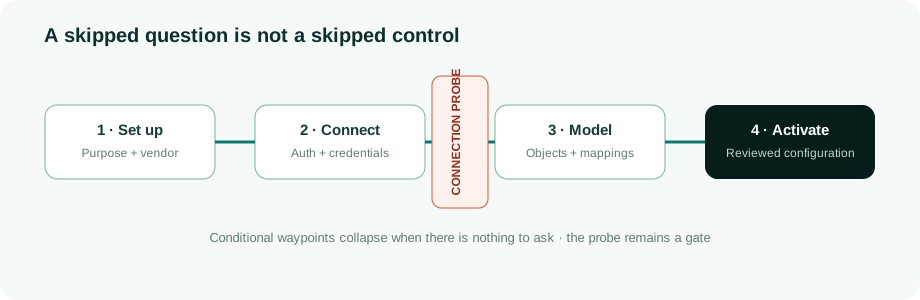
The chain
Sixteen waypoints exist in the state machine. A given run shows fewer — around thirteen for a typical single-authentication vendor — because a waypoint with nothing to ask is marked skipped rather than shown empty. The progress rail reflects that: it counts what this connector is actually asked, not what the state machine contains.
| Waypoint | What it settles | When it does not appear |
|---|---|---|
Which connector system_type |
An out-of-the-box vendor template or a generic protocol (REST, LDAP, SCIM, SQL, SFTP, SMB). | Never — it is the entry point. |
Vendor vendor |
Which specific vendor or protocol. | Always, in practice: it is collapsed into the grid above, and still tracked behind the scenes so that stepping backwards lands on the grid rather than on a second question asking the same thing. |
Role system_role |
Authoritative source, target, or bidirectional. Drives which account-type templates and write mappings are offered. | Never. |
Name and description name_desc |
How the system appears everywhere else. Pre-filled from the vendor label. | Never. |
Authentication method auth_method |
Which method this system supports, filtered to what the vendor declares. | For vendors offering exactly one — it is folded into the next step rather than asked. |
Connectivity connectivity |
How the platform reaches the system: directly, or through a proxy agent inside the customer network. Tunnel mode is offered only for engines that can use it. | Never. |
Credentials auth_credentials |
A per-field form derived from the vendor's declared fields. Secrets go to the vault; plain identifiers such as a tenant or client id do not. | When the method is none — see below. |
Base URL base_url |
Where the system lives, pre-filled from the catalogue. Also carries the optional health-check path and, for the HTTPS engines, the certificate-verification control. | Never, though it is often pinned and read-only. |
Sync strategy sync_strategy |
"Does an upstream directory already synchronise into this system?" A yes narrows the read filter so the platform does not try to govern objects another tool owns. | For vendors whose catalogue entry declares no such question. |
Objects and attributes objects_review |
Which objects to import, and per object which source attributes to fetch. | Never for vendor templates; protocol entries start from an empty list. |
Adopt the model test_and_map |
A live query runs per object, the administrator sees the real response, and the mapping onto the platform's own model is agreed on that evidence. | Where every enabled object is visibility-only there is nothing to map, and the step becomes a confirmation of what was found. |
Account types account_types_review |
Per type: governance scope, identity type, and the filter that recognises it in the target. | For configurations that hold no accounts — a pure source. |
Account rules account_rules_review |
Per type: the classification and correlation rules, with a live coverage run against real accounts. | When no active type has a rule to propose. |
Provisioning config provisioning_config_review |
The write mappings and lookups, and per mapping the operations it applies to. | For source-only or visibility-only configurations, which write nothing. |
Sync schedule sync_schedule |
Interval or cron. Fifteen minutes is the floor; zero means manual only. | Never. |
Confirm and activate confirm_and_activate |
Final review, then activation, which triggers the first synchronisation. | Never. |
Two things about that order are worth naming, because both were once the other way round. Attributes are chosen with the objects, not in a step of their own. Asking which objects to import and then, several screens later, which of their fields to fetch split one decision across two places and made neither legible. And the account model is settled after the live test, not before it. The classification and correlation rules are written against fields; which fields exist is a question the target answers, not the catalogue. Deciding the rules first meant deciding them against a guess, and discovering at the first synchronisation that the guess was wrong.
Steps disappear; they are not hidden
A skipped waypoint is recorded as skipped, and the rail's step count follows that recorded state rather than a hard-coded number. This matters more than it sounds. A wizard that renders an empty step teaches the administrator that empty steps are normal — which is precisely the habit that lets a genuinely empty step, one that should have had content and failed to load it, pass unnoticed.
The clearest case is authentication method none. A public endpoint has no secret, so the credentials step, whose entire content is a four-way choice about where a secret should be stored, has nothing to ask. It is skipped in both directions: forwards, the flow goes straight to the base URL; backwards, the step is stepped over too. A step reachable only by reversing into it is worse than no step, because it appears only to the administrator who is already retracing and therefore already unsure.
The connection gate
Once the draft connector exists, the platform tests the connection. If that test does not come back healthy, the wizard does not advance. It stays on the base URL step and shows what actually happened — the status, the error the target or the agent returned, and a certificate-specific hint where the failure looks like one. The administrator either goes back and fixes the URL or the credentials, or explicitly chooses to continue untested.
That choice is not a dismissal. It is recorded on the session, and the step before activation raises it again: this connector's connection was never verified, you continued past a failed test, synchronisation may not reach the target until it is corrected. The administrator can proceed — sometimes a target genuinely is not reachable yet, and blocking would help nobody — but not quietly.
The alternative is worth stating plainly, because it is what this wizard used to do. A step called "test the connection" that advances regardless is worse than having no such step at all. Without it, an administrator knows the connection is unverified and finds out at the first synchronisation, while still watching. With it, they have been shown a step whose name promises verification and reasonably conclude that verification happened; the failure is then discovered later, by someone else, against a connector that has been sitting in the systems list looking configured. A step that reports a result it never observed does not merely fail to add value — it removes the caution the administrator would otherwise have had.
One gate, not two. The direct path and the agent path below resolve through the same decision, because the interesting failure is a check that comes back late and unhealthy — exactly the case a second, parallel "is this good enough" check would be written for, and exactly the case it would get wrong.
Waiting for an agent, rather than guessing about one
Where the connector runs through a proxy agent inside the customer network, the test cannot be a function call. It is a task handed to a process on the other side of a network boundary, which may be busy, may be mid-restart, or may not be running at all.
So for an agent-mode connector the wizard enqueues the check and returns immediately, in an explicit waiting state, rather than holding the request open for a round trip that may take half a minute or never complete. The interface's existing polling is the poll loop; each read reports where the task actually is — still queued, or being run by the agent now — instead of a static spinner. When it resolves, the result goes through the same gate as a direct one: an agent reporting a real failure blocks exactly as a direct failure would, and an agent that never answers is reported as a timeout rather than folded into a generic error. The difference between "the target refused us" and "the agent never replied" is the difference between fixing a credential and starting a service, and collapsing the two costs the administrator the afternoon.
Blocking would have been simpler to write. It would also produce a wizard that appears to hang — and the state administrators respond to by retrying. A retry that creates a second draft connector on every impatient click is how a systems list acquires fourteen half-configured entries, so a retry against an existing draft updates it rather than minting another.
Account rules: a sample, not a projection
The account rules step used to show coverage badges — how many accounts would be classified, how many correlated to a person — derived from the shape of the rules. They were projections. Whether a rule classifies the accounts on this system is not a question the rule's own text can answer.
The step now runs a real coverage test: it samples real accounts from the target, applies the object's field mappings, runs the currently configured rules against that sample through the same engine that will run in production, and reports what they actually classified and correlated — and, more usefully, what they did not. The gap is the point. The sample is deliberately its own query of around fifty accounts rather than a reuse of the handful captured by the earlier live object test, because three accounts cannot show a gap.
Where no sample can be taken it says so, and reports nothing else. No numbers are produced from an unreachable target. Three answers exist and stay distinct:
- A sample, with results. The counts describe the accounts sampled, and say so.
- No sample. The target could not be reached, or the agent did not answer — named as such, with a way to run it again.
- A sample of zero. The target answered and returned no accounts. This is an honest result, not a failure: it usually means a search base or filter pointing somewhere empty, which is a real finding, and far better surfaced here than after the first synchronisation quietly returns nothing.
That third case took a correction to get right. A fetch that completed with zero records was being reported as "the target didn't respond" — the same message as an unreachable host, for the opposite situation. The target had responded perfectly; it was the configuration that was wrong, and the message pointed at the wrong half of the system.
Certificate verification
The base URL step carries a certificate-verification control for the engines that honour it — the HTTPS-based ones. Verification is on; the control turns it off.
It is deliberately the second-best option and is presented as one. Certificate trust is tenant-wide: an internal certificate authority, or a self-signed target certificate, is added once under environment settings and verified against everywhere after that — and because a self-signed certificate is its own issuer, that covers the one-off case too. Skipping verification is per connector, labelled insecure, and exists because some internal targets cannot be onboarded any other way today, not because it is a reasonable default. When a connection fails in a way that looks like certificate verification, the failure names both routes and puts the trust store first.
Back-navigation
Everything up to the base URL is safe to step back through: no record exists yet. From the objects step onwards a draft connector has been created, so stepping back re-emits the form against what is currently stored rather than what was typed. Going back past the point where the draft was created is refused — it would leave that record orphaned — and starting a new session is the route.
Cancelling deletes the draft connector outright, provided it never reached activation. It used to survive, on the reasoning that an administrator might want to resume it from the systems list; in practice that meant cancelling left something behind, and people who cancel expect things to be gone. A connector that did reach activation is left alone — it may have synchronised data and grants — and goes through the offboarding flow instead.
Known edges, published rather than discovered
- The certificate-skip control appears only for the HTTPS engines. The SDK-based vendor connectors do not read the flag today, and LDAP, SQL, SFTP and SMB have no HTTPS layer at all. Rather than show a control that would silently do nothing, the wizard hides it — which means an internal target on one of those engines has the tenant-wide trust store as its only route.
- "Continue untested" reaches activation. The warning is shown twice and recorded, but nothing blocks an unverified connector from being activated. That is deliberate, since a target being unreachable is a normal state mid-migration — and it means an activated connector is not, by itself, evidence that its connection works.
- Coverage counts describe a sample. Around fifty accounts, not the estate. A rule that covers the sample completely can still leave a gap in a population large enough to contain shapes the sample did not include.
- The wizard configures; it does not verify the model end to end. A connector can be activated with mappings that are internally consistent and still wrong about the target. What catches that afterwards is the parity checking and the advisor — see Read/write parity.
Further reading: