One person, many accounts
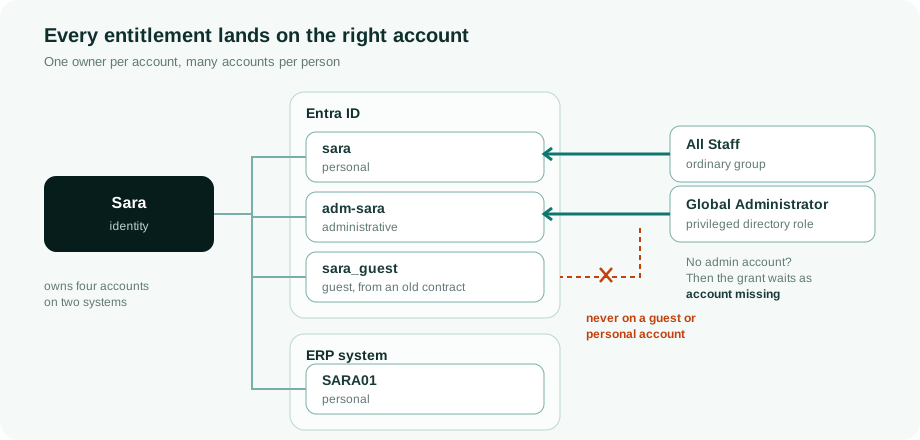
An identity holds access through accounts. Each account lives on one system and belongs to at most one identity, but one identity can have many accounts: one per system it uses, and often several on the same system, such as a personal account and a separate administrative one. The platform decides per entitlement which of those accounts receives it, and it never puts a privileged right on a personal account.
An account has one owner
Sync reads the accounts on a target system. Correlation then links each account to the identity that owns it, using the system's correlation rules: typically the e-mail address against the user principal name, or an employee number against an attribute of the account. An exact, unique match links automatically; anything else becomes a proposal for a person to confirm. See Account rules.
- An account with no owner is an orphan. It stays visible and countable, and it is deliberately left unclassified rather than guessed to be personal.
- A service account can be a governed non-human identity with its own owners
and lifecycle, or simply an account classified as
service. The difference matters, and Ownership and non-human identities explains it.
Several accounts on the same system
Each account is classified by purpose: personal, administrative, service, break-glass, guest, contractor, shared and so on. The classification decides its account type, and the account type carries the governance for that category on that system.

Take one person with three accounts in Entra ID: a personal account, an administrative account and a guest account left over from an earlier contract.
| Entitlement | Goes to | Why |
|---|---|---|
| An ordinary group, such as All Staff | The personal account | Ordinary rights go to the personal family (personal, permanent, contractor). If the person has none of those on the system, they go to the account the person does have, so a lean set of accounts never blocks routine access. |
| A directory role such as Global Administrator | The administrative account only | Privileged routing is strict. No personal or guest account is ever substituted. Without an administrative account the grant waits as account missing. |
Two more settings refine the choice:
- An entitlement can name the account type it belongs to, and then only accounts of that type qualify.
- When a person has several accounts of the same type, the one marked primary wins, then the oldest.
The same routing applies wherever a grant comes from: a policy, a request or a reconciliation run.
When the right account does not exist
Whether the platform may create a missing account is set per account type, with a system-wide default and an override per entitlement type. When it may, the account is created first and the grant follows in the same provisioning batch. When it may not, the grant stays visible as account missing until someone creates the account or changes the rule.
A leaver is the exception. A person HR has terminated who has no account on a system gets no account missing warning for it, and the platform does not plan a new account for them, even where it may create missing accounts. The entitlement still follows the leaver grace in JML flows, so it is kept inside the grace and dropped after it; an account the leaver still holds is handled as before.
Why an account exists, and when it goes
Accounts follow the same reasons as grants. An account exists because at least one reason does: a policy that gives everyone of a kind an account (a birthright), an approved request, or an entitlement that needs it.
- When its last reason ends, the account lapses: it is disabled after the grace period and deleted later, on the timing set per account type.
- When a status holds every reason, for example a contract on leave or a lock, the account is disabled without starting that clock, and comes back when the status ends. Nothing is deleted.
- When another reason remains, the account stays. A person with two contracts keeps an account the second contract still needs. See Employments and multi-affiliation.
The joiner, leaver and delete timing are in JML flows.
Unused accounts
The Accounts list has three views: All, Unused and No person. An account is unused when it has not signed in for longer than its system's threshold. The evidence is the last sign-in and creation date the target sync stores. It is the account's own last sign-in, never a date per right.
- Which systems report a last sign-in (since 16 November 2026): Microsoft Entra
(
signInActivity; where that gives no date, the Microsoft 365 last-activity date from the usage report, read with the optionalReports.Read.All), Active Directory (lastLogonTimestamp, which AD updates with a delay of up to about 14 days), Google Workspace, Salesforce (User.LastLoginDate) and ServiceNow (sys_user.last_login_time). The integration user needs read access to that field; a field it cannot read comes back empty and counts as no sign-in source. - Your own field. REST, SQL, SFTP-CSV and SCIM systems have no standard last-login field, so an administrator maps one: Last sign-in is one more attribute in the account mapping. Nothing guesses a field name; an unmapped system reports no sign-in.
-
An empty or unreadable date is unknown, never unused: never logged in, a placeholder date, a date in the future or a value that does not parse all count as unknown.
-
The threshold is derived per system: twice the number of days within which 97 % of active accounts sign in, between 60 and 365 days, and 90 days while a system has fewer than 20 samples. A system where fewer than 30 % of enabled accounts report a sign-in is not tracked and flags nothing; it reads "No sign-in source yet".
- A person with write rights on accounts can override it per system (30 to 730 days). The derived value stays visible next to the override and can be restored.
- Keep marks one account as quiet on purpose (a break-glass account, for example), with a reason and an end date of 30, 90, 180 or 365 days. A kept account is not unused.
Clean-up starts with a dry run that writes nothing: per account what would happen or what blocks it (still needed by the target state, privileged, legal hold, protected, the system's writes off or held, a frozen tenant), and per system the room under the provisioning rate limit and whether a delete can be undone there. Switching off goes through the normal write path and a keep-off decision, so reconciliation does not switch the account back on. Deleting is a second step: only accounts the clean-up switched off, only after a grace period (30 days by default, at least 7 unless an administrator lowers it), with the count typed to confirm. Within that period Undo switches the account back on; after a delete, undo restores it where the target can (Entra, Google, an AD recycle bin) or re-creates it with the same data and new credentials, and says so. Privileged accounts are cleaned one at a time, never in a batch. Clean-up has its own permission, held by administrators only.
An unused account the target state requires goes to its manager (since 14 November 2026). An account that a role, a birthright rule or an approved request still asks for is never cleaned up, because reconciliation would create it again. The Unused view splits on Required by the target state and Not required, and for a required account Ask manager to review sends the person's manager one question per account: is this access still needed? A preview says how many reviews go to how many people before anything is sent; an account that already has a review waiting is skipped. Nothing is switched off or deleted by asking. Keep stops the account being flagged as unused for 180 days. Remove withdraws the access, switches the account off and keeps it off, and reconciliation then retires it. There is no deadline: silence removes nothing. When no manager can decide, the tenant's fallbacks and then the IAM team are asked. Accounts held only by a rule, or whose person is locked, are counted but not asked about. The view counts the reviews waiting, kept and removed.
An orphan can be switched off. On Account rules › Insight, Switch off for an account nobody owns disables it in the target, through the same gates, and records a keep-off decision; nothing is deleted. Switch back on on the account page undoes it once no open decision keeps it off.
A person's app passwords and tokens
An app password or a personal token signs in without the person's SSO and MFA, and it keeps working after the person leaves. Where a connector reads them, RapidValue keeps them per person: Google Workspace app passwords; Salesforce OAuth tokens and ServiceNow refresh tokens, API keys and OAuth applications for every user, not only integration users; and the RapidValue API keys whose secret a person saw. A credential is matched to the person through their account on that system. The secret values are never read.
- Where you see them. The Access tab of a person, and the decide pane of that person's access review, which says how many of them still sign in.
- A leaver who keeps one. The Advisor raises a finding for a leaver whose credential still signs in.
- Revoking at the source. Per system (Google, Salesforce and ServiceNow), under Writes › Processing, revoking is off (the default), manual (a Revoke button on the Access tab, with a confirmation) or automatic (one attempt per credential when the person leaves). A revoke goes through the same write gates, revoke budget and audit as any other removal. The credential is marked gone only when the next complete read no longer lists it. A ServiceNow OAuth application is not switched off.
Deleting an identity
Since 8 November 2026 an administrator with the identity:delete permission can
delete an identity that is finished with: More > Delete identity on a terminated
person who holds no access, has no live account and has no open request. The dialog
lists what is still in the way when one of those is not yet true.
Delete is a soft delete. The identity leaves the lists, pickers, search, dashboards and the billable identity count, but it stays in the database and in the audit trail, so an auditor can still find it: the Identities list has a Deleted identities filter for whoever holds the permission. A deleted identity is read only: an edit, a bulk or CSV update and a sync are refused or leave it unchanged, and HR imports create no employment rows for it. Restore identity on its banner brings it back. Delete and restore each write one audit event with the reason and who did it.
This is not the GDPR erasure, which pseudonymises a person for good and cannot be undone.
Related
- Account types: scope, purpose class and settings per type.
- Account rules: correlation and classification.
- The data model: where accounts sit in the model.